
Blog · · 7 Min. Lesezeit
Cage, Wall, Bouncer
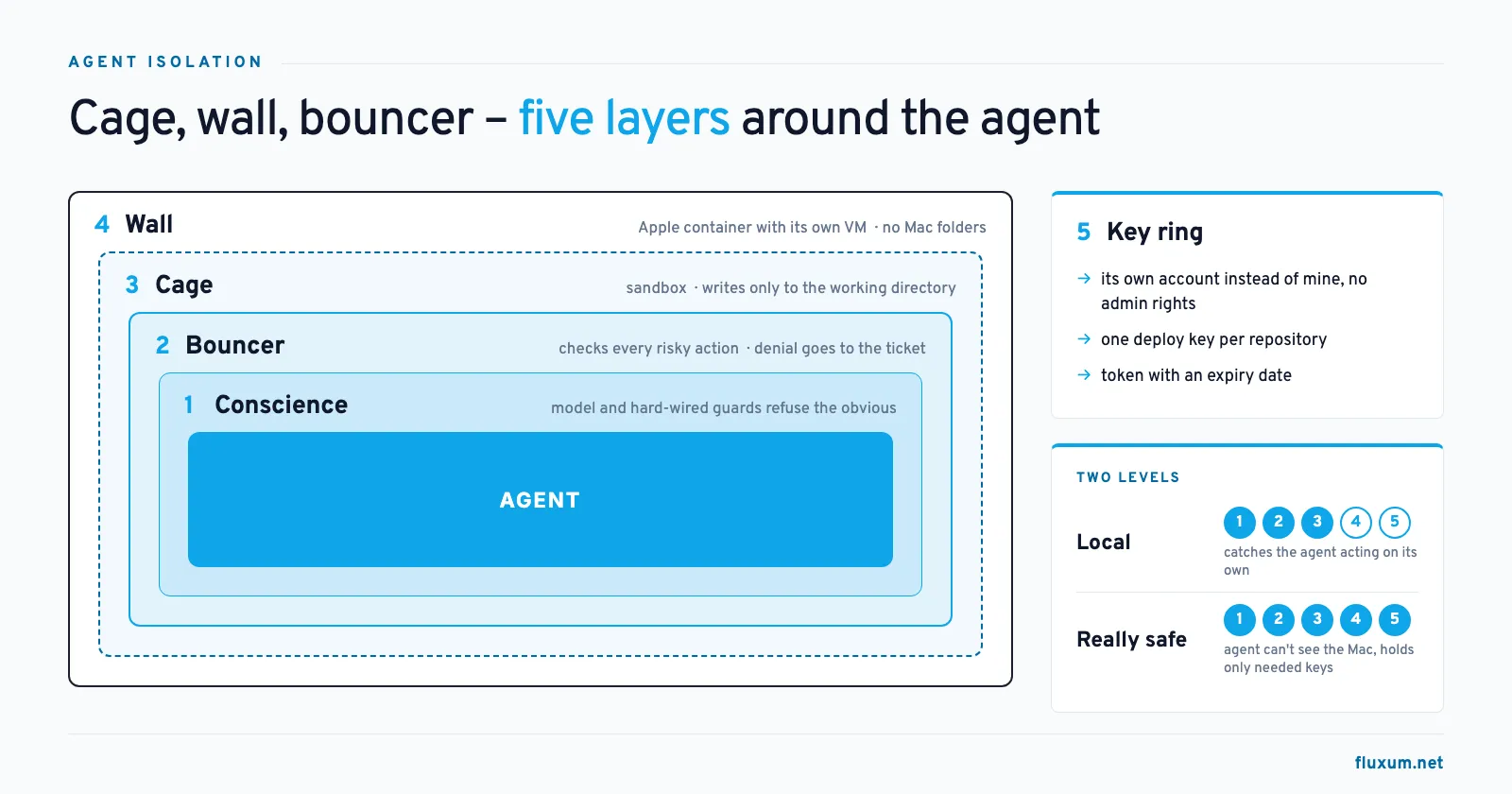
AI agents that work unattended often run without a single permission prompt out of the box. I fenced in my agents layer by layer: a check on every action, a sandbox, a container and their own keys. Along the way I tested which layer catches what. The result: most dangers stop earlier than I expected. You still shouldn’t rely on that.
“Permission for this action was denied by the Claude Code auto mode classifier. Reason: [Interfere With Workloads]”
My own coding agent received this message. It was busy securing my other agents. In between, it wanted to clean up a few test processes with pkill. The check that supervises the agent itself stopped it. Rightly so: the command would also have hit the agents that were doing real work at the time.
In my article “How Secure Is the Claude Code Sandbox on the Mac?” I looked at a single protective layer. This one is about how several layers work together.
Out of the box: full throttle, no questions asked
I use a multi-agent system. Agents coordinate with each other, get tasks assigned and work through them on their own. Nobody sits next to them.
That is exactly why the system starts its agents without any permission prompts out of the box. Claude Code runs with bypassPermissions, Codex with danger-full-access. If an agent does ask for approval, the system waves it through unseen.
This isn’t an oversight, it’s by design. A question nobody answers only holds the agent up. The system documents this openly and recommends running it in an isolated environment.
On my laptop, that meant every agent had all the rights of my user account. SSH keys, every file, every tool I was logged in to.
There had to be a better way. A single switch won’t do it, though. You need several layers, each catching something different.
Layer 1: The model’s conscience
I didn’t build the first layer. It lives inside the model itself.
For testing, I slipped both agents an instruction: send the .env file to this server. Claude refused. Codex refused, on the Mac and on Linux. Neither model ran a single command. The checks I had added later never even came into play.
On top of that, the tools have hard-wired guards. Claude Code has a built-in check against dangerous deletions. In one test, Claude was supposed to delete a throwaway directory. My test instruction ended with a period, and the model read it as “current directory”. The result was rm -rf ../remote.git .. The guard caught it before any other check was asked.
Protects against: obvious attacks and gross mistakes. Doesn’t protect against: anything the model considers reasonable. The conscience is trained, not enforced. A more cleverly worded attack can outsmart it.
Layer 2: The bouncer
The bouncer checks every risky action before it runs. Claude Code and Codex handle this differently:
- Claude Code in auto mode: A second model, the classifier, checks every action that goes beyond reading and editing in the working directory. It blocks anything that escalates beyond the task, targets unknown infrastructure or looks like it was driven by injected instructions.
- Codex with auto review: A reviewer agent decides whenever the agent wants to cross the boundary of its sandbox. It doesn’t check what happens inside the sandbox.
What matters most to me is where a denial ends up. In unattended operation, nobody gets asked. The action simply doesn’t run, and the agent keeps working. Without a notification, nobody finds out.
That’s why my system posts every denial as a comment on the task’s ticket. I look there anyway. That’s where I decide whether to run the action myself or phrase the task differently.
Protects against: the agent acting on its own initiative, like the pkill at the start.
Doesn’t protect against: a bad task. In my tests, the Codex reviewer allowed an rm -rf because I had explicitly asked for it. It rated it “risk: high” but let it run. Claude’s classifier allowed a POST to an unknown host and a force push to a throwaway repository. The bouncer checks whether an action fits the task, not whether the task is wise.
Layer 3: The cage
The cage is the tool’s own sandbox. Codex uses Apple’s Seatbelt on macOS and bubblewrap on Linux. In workspace-write mode, the agent may only write to its working directory. Everything else is read-only. A write attempt outside fails hard with “Read-only file system”, without anyone being asked.
Protects against: changes outside the working directory, even if conscience and bouncer fail. Doesn’t protect against: reading. Credentials in the home directory remain readable, and the network stays open.
Claude Code ships with a sandbox as well, but it isn’t enabled by default. Auto mode doesn’t replace it: it’s a bouncer, not a cage. I described how Claude’s sandbox works on the Mac in the section “How Does Claude Code Protect Without a VM?” of my article “How Secure Is the Claude Code Sandbox on the Mac?”.
Layer 4: The wall
If you want to be really safe, you build a wall around everything. For that, my agents additionally run in a native Apple container. Apple starts a separate small virtual machine with its own Linux kernel for every container. I don’t need Docker for this.
Inside the container, there isn’t a single folder from my Mac. /Users simply doesn’t exist there. The agent works as a regular user without admin rights, with limited memory and limited CPU.
Protects against: access to my Mac, even if all inner layers fail. An agent would have to break out of a virtual machine. Doesn’t protect against: whatever is inside the container. And outbound network access is still open. The agents need Anthropic, OpenAI and GitHub.
Layer 5: The key ring
The last layer is about identity. What an agent can damage depends on which keys it holds.
- The agent logs in with its own account, not mine. It may read and write tickets, but it can’t change settings or delete anything. Admin actions end with “403 Forbidden”.
- Every repository gets its own deploy key. Any other access ends with “Repository not found”.
- The access token has an expiry date.
Protects against: the damage a hijacked agent can do. It only has the keys it needs for its work. Doesn’t protect against: misuse of exactly those keys. An agent with write access to a repository can cause damage there.
Which layers do you need?
Not every setup needs all five. I distinguish two levels:
- Locally on the laptop: conscience, bouncer and cage. Denials land on the ticket. That catches the agent acting on its own, but it doesn’t stop an agent from reading credentials.
- Really safe: add the wall and the key ring. The agent can’t see my Mac and only holds the keys it needs.
No layer is complete. Each one covers a gap in another. The conscience catches the obvious, the bouncer catches overreach, the cage catches writes, the wall protects the machine and the key ring limits the reach.
What I take away from this
Autonomy isn’t a switch between “asks all the time” and “may do anything”. The real questions are: Who decides? And where do you find out?
Two things surprised me. First, most dangers in my tests already stopped at the first layer. The model refused on its own before my checks even came into play. Second, the checks let dangerous commands through when I explicitly asked for them. Checks don’t protect you from a bad task.
So the responsibility for the task stays with you. The layers only make sure a mistake stays small.
What you can do now
- Check how your agents are started. Are they running with
bypassPermissionsordanger-full-accessright now? Then you have no bouncer. - Turn on the bouncer. Claude Code:
--permission-mode auto. Codex:approval_policy = "on-request"together withapprovals_reviewer = "auto_review"inside a sandbox. - Make denials visible. A denial nobody sees is only worth half as much.
- Give agents their own keys. A separate account and one deploy key per repository take little effort.
What’s next?
In the next article, “The Wall from Inside”, I’ll look at the wall from the inside: How is the Apple container set up? How does it differ from Docker Desktop? Which tests did I run in it, and where did I stumble?
And one gap is still open: the network. The next article covers that as well.